AI
Ask your plant questions — in the app and from your own agents
Ask your plant questions in plain language — inside the app for operators and analysts, and over MCP for external AI agents.
In the app
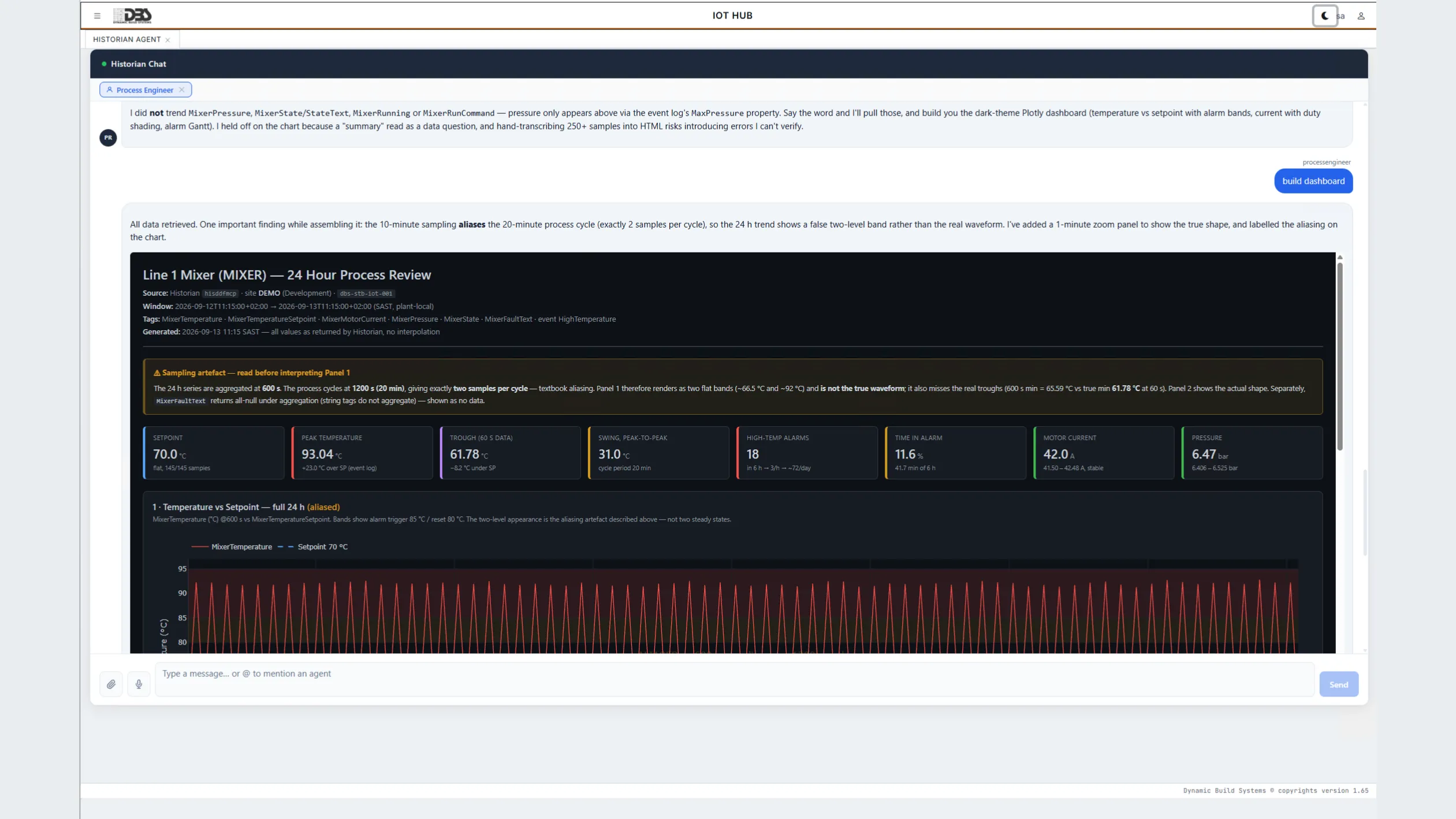
Historian Agent
A chat assistant that speaks historian. Ask about equipment, events and tags across every configured historian connector — no query language, no export to a spreadsheet first.
The Historian Agent lives in its own tab of the web app. Type a question the way you would ask a colleague — which conveyors tripped most this week, what a mill's feed rate did during last night's shift, how long the longest stop lasted — and it answers from the historian data connectors you have configured. A plant manager gets the number; an engineer gets the trend behind it.
Answers come from the configured connectors, not from a model's memory: the assistant is wired to the same historian data the dashboards and trends read, so a figure it quotes is a figure the plant recorded.
- Natural-language questions about plant data across historian connectors.
- Grounded in the live historian — figures come from the historian, not from a model's memory.
- Through DBS Invenio — configured and governed in one place together with the trend assistant.
- Off until you switch it on — the assistant activates only once it is enabled and configured.
In the app
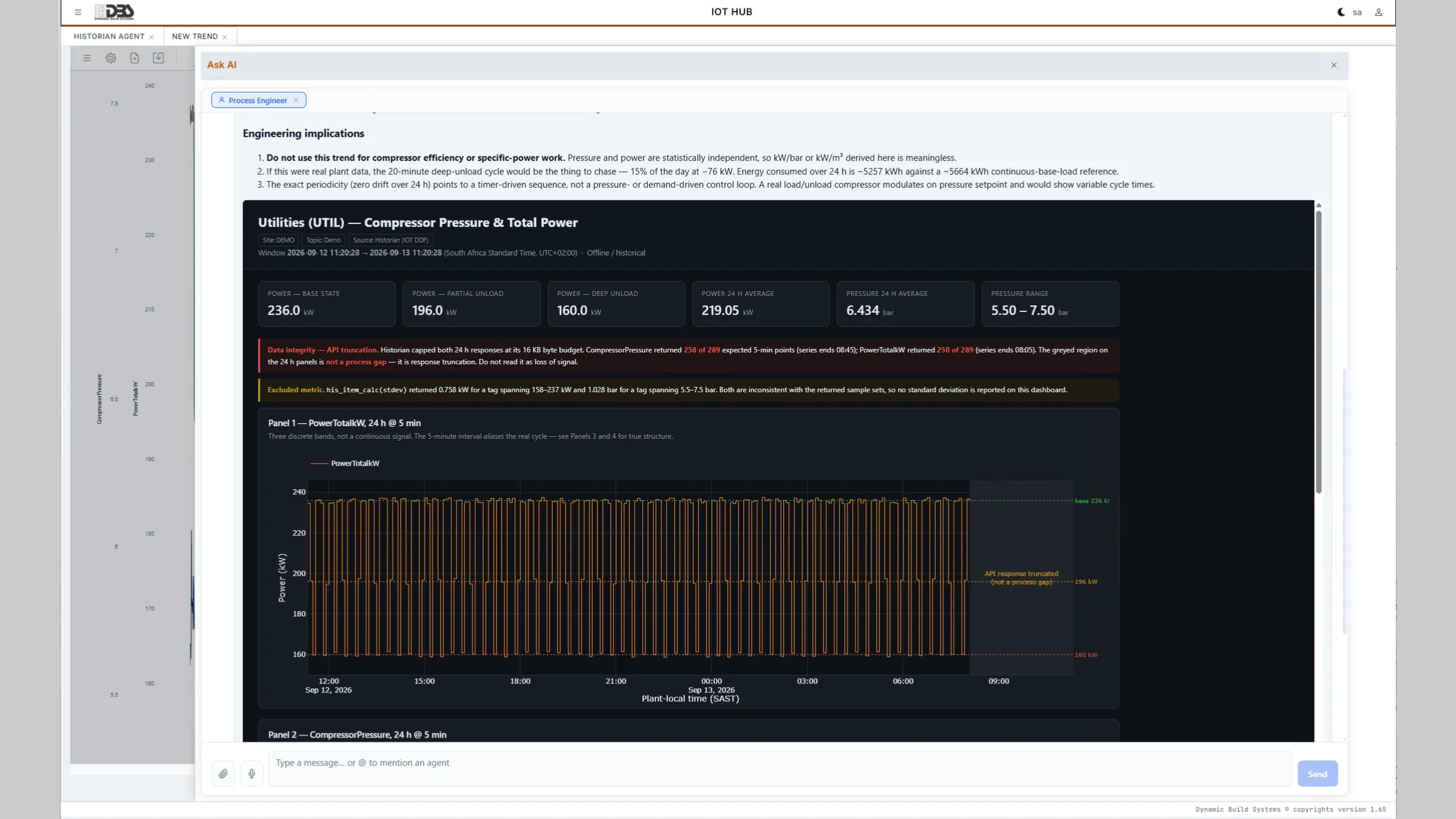
Ask AI beside any trend
Open the assistant next to a trend and question exactly what is on screen.
The trend assistant is grounded in the exact on-screen window. The traces you have plotted, the time range you have zoomed to and the data behind them travel with the question, so an answer about a vibration step, the average before and after it, or whether the pattern matches last week's refers to the same points you are looking at — not a generic historian query.
Ask about patterns, anomalies and statistics in the window; get the key figures with the explanation. Close the panel and reopen it while the trend is open — the thread and its context are still there.
Over MCP
Open to your own agents
An API-key-protected MCP server over HTTP lets the agents you run discover equipment, inspect alarm and KPI definitions and pull time-series from the historian.
| Tool | Purpose |
|---|---|
his_server_info | Which plant this server answers for, and whether the historian is reachable |
his_schema_entities | List the readable entity types |
his_schema_describe | Fields and filterable properties of one entity type |
his_resolve | Turn a name or code into candidate records with their ids |
his_entity_get | Read one record, optionally with its related records |
his_entity_query | List records with structured filters and paging |
his_item_timeseries | Tag history over a window, aggregated to a sample interval |
his_item_calc | Average, max, min, standard deviation or sum-of-max for a tag |
his_ft_event_log | Event occurrences with each event property as a column |
his_event_log_query | Event log records, including occurrences still in progress |
GetEquipmentList | List configured equipment |
GetEquipment | Inspect one piece of equipment |
GetEquipmentCategories | Browse equipment categories |
GetEquipmentConfiguredEvents | Configured alarms and events with live trigger state and expressions |
GetEquipmentConfiguredKPIS | KPI definitions per equipment |
GetEquipmentKPILog | Historical KPI results |
GetEquipmentNodes | Tags and nodes attached to equipment |
GetEquipmentNodeData | Tag time-series at per-second to per-day sample rates |
18 equipment-centric tools ship today. Point any MCP-capable agent at the server with its API key and it can work from:
- Equipment lists and categories
- Configured alarms and events with live trigger state and expressions
- KPI definitions and historical KPI logs
- Tag time-series at per-second to per-day sample rates
{
  // MCP client entry — point it at the historian server
  // and send your API key in the X-Api-Key header
  "mcpServers": {
    "historian": {
      "url": "http://localhost:5000/sse",
      "headers": { "X-Api-Key": "your-api-key" }
    }
  }
}AI platform
Powered by DBS Invenio
Both in-app assistants run through DBS Invenio, the vendor's multi-LLM gateway and agent platform; your own agents reach the historian directly over MCP.
In the app, through one gateway
The Historian Agent and the trend assistant both run through DBS Invenio, the vendor's multi-LLM gateway and agent platform. One place to configure, one place to govern.
Your own agents, directly over MCP
External agents do not pass through the gateway. They connect straight to the historian MCP server with an API key and work from the same historian the assistants use.
Models on your own infrastructure
The assistants run through DBS Invenio, which can be deployed with models hosted on your own infrastructure — ask about the local-model option for your deployment.
Fails closed
Nothing activates until it is explicitly enabled and configured. The Historian Agent tab and the trend assistant stay off until an administrator turns them on and supplies the DBS Invenio connection details. The MCP server is a separately deployed, API-key-protected process that answers nothing without a valid key — and the rest of the platform works exactly the same without any of them.
How the AI layer connects
Two lanes, one historian: the in-app assistants reach it through DBS Invenio; your own agents reach it through the MCP server.
AI integration
- User → Chat assistants (Historian Agent, Ask AI)
- Chat assistants → DBS Invenio
- AI agent → Historian MCP server (MCP over HTTP)
- Historian MCP server → 18 equipment analytics tools
- 18 equipment analytics tools → Historian
- Historian MCP server → Expanded tool catalogue (roadmap, dashed)
AI, by the numbers
- 2in-app AI assistants
- 18MCP tools for external agents
- per-second to per-daytime-series sample rates
- 0AI features active until configured
See the assistants on live plant data.
Bring a question your plant asks every week. We will answer it live, in the app and from an agent.